

Threads is a popular place for people to share short videos, viral videos, and other interesting content. But the platform doesn’t let you download videos directly to your device.
Threads Grabber is the easiest way to save Threads videos for offline viewing on your iPhone. It’s a free online Threads video downloader that works right in your browser.
This guide will show you how to use Threads Grabber to download Threads videos on your iPhone in just a few easy steps.
Why should you use Threads Grabber to get Threads videos on your iPhone?
A lot of people who own iPhones have trouble downloading videos from Threads because the app limits downloads. That’s when Threads Grabber comes in handy.
It’s an easy-to-use online tool that changes Threads video links into MP4 files that you can download.
You can download Threads videos straight to your iPhone with Threads Grabber without having to install anything.
Main Benefits
Works with all mobile browsers and Safari on iPhone
Get Threads videos in HD MP4 format
You don’t need to install any apps.
Quick video processing
No cost to use
Works with iOS, Android, Windows, and Mac
How to Download Threads Videos on Your iPhone Step by Step
Use Threads Grabber to download any Threads video by following the simple steps below.
Step 1: Launch the Threads App
Open the Threads app on your iPhone to get started.
Look through the feed until you find the video you want to download.
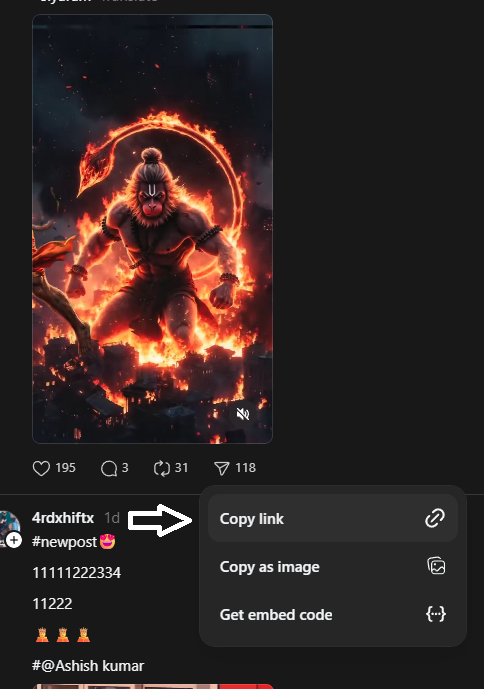
Step 2: Copy the link to the Threads video
After you find the video:
On the Threads post, tap the Share button.
Choose Copy Link
This will put the video URL in your clipboard.
Step 3: Go to Threads Grabber
Now, open Safari or your favorite browser and go to
👉 https://threadsgrabber.com This is the official tool for downloading Threads videos.
Step 4: Copy the URL of the Threads video
There is a download box on the main page of Threads Grabber.
Put the copied Threads video link in the box and click Download.
The tool will automatically handle the video.
Step 5: Get the video on your iPhone
After it has finished, Threads Grabber will make a button that says “Download MP4.”
The video will start downloading to your iPhone when you tap the button.
Depending on how you set up your browser, you can find the video you downloaded in either the Files app or the Photos gallery.
How to Download Threads Videos on Your iPhone
Keep these tips in mind to make sure your downloads go smoothly:
For better compatibility, use Chrome or Safari.
Make the Threads video available to everyone.
Make sure your internet connection is stable.
Always copy the whole link to the Threads video.
These tips will help the video download quickly and without any problems.
Is it possible to download Threads videos without an app?
Yes. With tools like Threads Grabber, you do not need to install any third-party apps.
You can do everything right in your browser. This makes the process safer and faster compared to installing unknown applications.
Common Questions
Is it free to use Threads Grabber?
Yes, Threads Grabber lets people download Threads videos from the internet for free.
Is it possible to download Threads videos on an iPhone without an app?
Yes. You just need a browser like Safari and a tool like Threads Grabber.
What kind of file do Threads videos come in?
Most videos are in MP4 HD format, which works on all devices.
Does Threads Grabber put watermarks on things?
No. Videos downloaded with Threads Grabber don’t have a watermark.
Soo….
It’s easy to download Threads videos on an iPhone with Threads Grabber.
You can quickly save any public Threads video in high-quality MP4 format by copying the link to the video and pasting it into the downloader tool.
If you frequently want to save Threads videos for offline viewing, Threads Grabber provides one of the easiest and fastest solutions available.